Dashboard Integration Background Header

DashThis integrates directly with Facebook Ads, allowing marketers to automatically pull campaign, engagement, conversion, and revenue data into beautiful dashboards, without manual exports or spreadsheets.

What can you do with the Facebook Ads integration in DashThis?

  • Create Facebook Ads dashboards that update automatically

  • Track impressions, clicks, conversions, cost per result, and ROAS

  • Monitor ad creatives, ad sets, and campaign performance in one place

  • Combine Facebook Ads data with Google Ads, GA4, SEO, and social media metrics

  • Share automated, client-ready reports with your team or stakeholders

  • 10 +

    Preset Widgets

  • 49 +

    Dimensions & Metrics

  • 2 +

    Dashboard Templates

How to connect Facebook ads to DashThis

See this dashboard in action here!

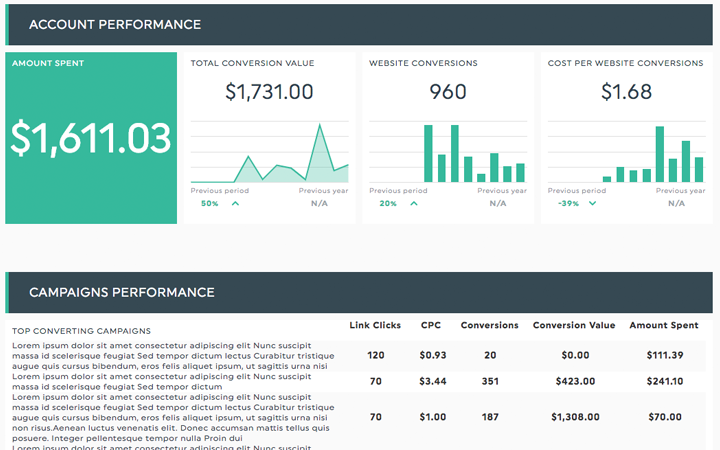
Facebook Ads Dashboard social media templates Connect your Facebook Ads account

Select Facebook Ads from the integrations list and connect your Meta Ads account. DashThis supports multiple ad accounts, so you can manage, streamline, and report on all your ads campaigns in one place.

All your data sources Choose the key metrics and dimensions you want

Select the Facebook Ads metrics you want to track, such as impressions, clicks, CTR, conversions, cost per result, ROAS and then display them using fully customizable widgets and visualizations tailored to your reporting needs.

Completely automated Facebook Ads Dashboard Your dashboard updates automatically

Organize your widgets, customize the layout, and add your branding, including logos and colors. Once your setup is complete, your Facebook Ads dashboard updates automatically with the latest campaign data, saving you time and money.
What Facebook Ads metrics can you track in DashThis?

DashThis lets you track your most important Facebook Ads KPIs, metrics, and dimensions in fully customizable dashboards. Monitor facebook ads performance, engagement, costs, and return on investment, all in one automated report.

Facebook Ads Dashboard Preset Widgets
  • Traffic & engagement metrics

    Measure how users interact with your ads and how effectively you drive traffic.

    • Ad Clicks – Total number of clicks on your ads over time.

    • Click-Through Rate (CTR) – Percentage of users who saw your ad and clicked.

    • Actions – Total number of actions attributed to your ads (clicks, engagements, conversions, etc.).

    • Post Engagement – Total interactions involving your ads.

    • Post Comments – Number of comments received on your ads.

  • Reach & visibility metrics

    Understand how widely your ads are distributed and seen.

    • Reach – Total number of unique users who saw your ad at least once.

    • Frequency – Average number of times each user saw your ad.

  • Cost & efficiency metrics

    Evaluate how efficiently you’re spending your advertising budget.

    • Ad Spend – Total amount spent on campaigns, ad sets, or ads.

    • Cost Per Click (CPC) – Average cost paid for each click.

    • Conversion Rate – Percentage of results achieved compared to total ad clicks.

  • Revenue & performance metrics

    Measure the financial impact of your advertising efforts.

    • Return on Ad Spend (ROAS) – Revenue earned for every $1 spent on ads.

  • Campaign breakdowns & dimensions

    Analyze performance at a more granular level to optimize your strategy.

    • Ad Set – Breakdown of results by Ad Set name.

    • Ad Creatives – Breakdown by ad name and creative thumbnail.

    • Top Performing Ads by Clicks – Identify which creatives drive the most engagement and traffic.

Want to see all our Facebook Ads preset widgets? 
You’ll find them in your new dashboard!

Try it free

Get started with our TikTok Ads report template

Impressions, demographics, clicks, CTR, conversions, CPA, CPM, ad spend… There are so many KPIs you could track in your TikTok Ads report, and choosing the right ones for your agency clients or business can quickly become overwhelming.

DashThis offers a ready-to-use TikTok Ads reporting template that highlights the metrics that matter. For a broader view, combine it with our all-in-one Social Media report template to track paid and organic performance in one unified dashboard. 

see our tiktok ads report template
tiktok reporting templates

Combine TikTok Ads with other integrations

Get a more complete view of your digital marketing performance by combining TikTok Ads data with these additional integrations in your DashThis dashboard:

Facebook Ads Integration FAQ

How to create a dashboard from the facebook ads dashboard template?

Simply start a free trial, connect your facebook ads account via our meta ads integration and select the “facebook ads” dashboard template in the dashboard creation process.

What is a facebook ads dashboard?

A Facebook Ads dashboard is a visual representation of key performance metrics from your Facebook advertising campaigns. It consolidates data into easy-to-read charts and graphs, allowing marketers to monitor campaign effectiveness, track ROI, and make data-driven decisions to optimize their advertising strategies.

What key metrics and KPIs should a facebook dashboard include?

A comprehensive Facebook Ads dashboard should include metrics such as ad spend, impressions, reach, clicks, click-through rate (CTR), cost per click (CPC), conversions, conversion rate, cost per acquisition (CPA), and return on ad spend (ROAS). These KPIs provide a holistic view of campaign performance and efficiency.

Can I combine different data sources & integration in the same dashboard?

Absolutely! our platform allows you to combine multiple data sources and different API integrations within a single dashboard, with no technical kowledge. It's a great way to get the full picture of your marketing efforts, all in one friendly, easy-to-read place.

Why having a facebook ads dashboard is important?

Having a Facebook Ads dashboard is like having a trusty co-pilot on your marketing journey. It keeps you in the loop with real-time updates, helps you spot trends and opportunities, and saves you from hours of manual number-crunching. With this friendly helper by your side, you can make smarter decisions and get the most out of your ad budget.

What can you learn from our facebook ads dashboard template?

Our Facebook Ads dashboard template offers insights into campaign performance, audience engagement, and ROI. You'll learn which ads are most effective, understand what messaging resonnates with your audience behavior, identify inefficient spending, and discover opportunities for improvement. This template empowers you to make data-driven decisions to enhance your Facebook advertising efforts.

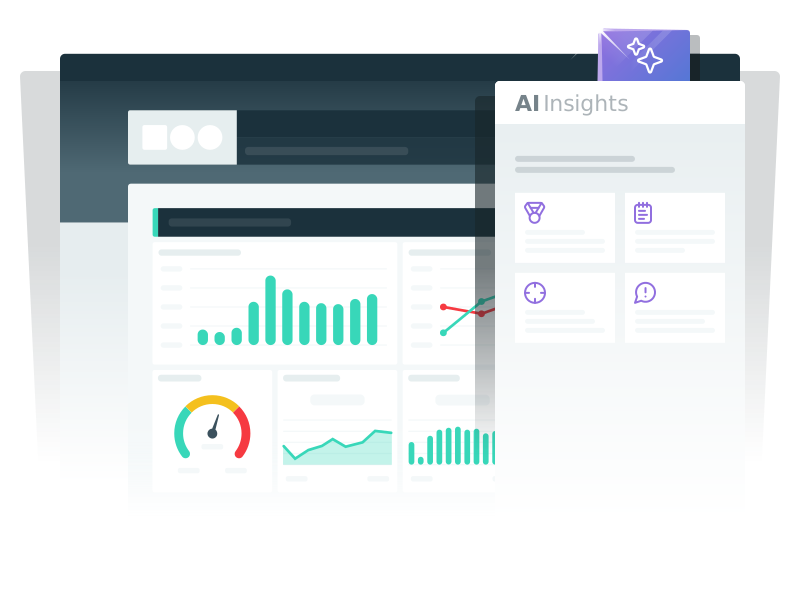
AI Insights: Turn Facebook ads data into clear insights

Turn raw Facebook Ads performance data into clear, actionable insights instantly. With one click, AI Insights analyzes your Facebook Ads dashboards to uncover key campaign trends, performance wins, cost inefficiencies, and optimization opportunities, helping you deliver smarter, data-driven decision for your team or clients.

Built for marketing agencies and streamlined client reporting, AI Insights transforms complex ad data into clear takeaways, so you can create smarter Facebook Ads reports and spend less time digging through Ads Manager.

Try it now
AI Insight

Why choose Dashthis

Easy to set up, easy to use

Bring your marketing data together in minutes. DashThis makes it simple to connect your tools, use preset widgets, and build dashboards without technical setup or manual work.

Built for branded reporting

Create dashboards and reports that reflect your brand—or your clients’. Add logos, colors, layouts, and white-label options to deliver polished, professional reports every time.

Dashboard Integrations Turn data into clear insights

DashThis helps you go beyond numbers. With AI Insights and customizable dashboards, you can quickly understand what’s happening, why it matters, and what to focus on next.

Automated, recurring reports

Once your dashboards are set up, DashThis takes care of the rest. Schedule reports to send automatically—weekly, monthly, or on your own cadence—so reporting never slows you down.

Flexible customization for every use case

Customize your dashboards to fit your reporting needs: whether high-level summaries or detailed performance reports. Choose your layout, highlight the right metrics, and tailor visuals to match your clients’ branding.

Easy sharing for teams and clients

Share insights through live dashboards, scheduled emails, or downloadable PDFs. DashThis makes it easy to keep everyone aligned—without giving access to your data sources.

Loved by thousands of marketers

With satisfied clients across 120+ countries, DashThis is the power behind countless online marketing reports, here are some of the reasons why:

  • I was skeptical about DashThis’s new AI Insights but when I tried it, I was shocked. It sounded exactly like how I’d write it, with accurate and even insightful recommendations. I’m really looking forward to seeing how much time we can save this month.
    Pam Kearley Director of Strategy
  • Easy, convenient, and fast to set up.
    Laurent Roumieu - PPC Analyst / Paid Search / Performance Media Laurent Roumieu PPC Analyst / Paid Search / Performance Media 360i Canada
  • The biggest benefit is the time saved in terms of data collection. It's also great that the design is very pretty out of the box.
    Jonas Meister - Digital Marketing Strategist Jonas Meister Digital Marketing Strategist GnuWorld
  • We've played around with countless reporting tools over the years but none of them come anywhere close to Dashthis. The level of integration and customization of reports, as well as their outstanding client support are unrivalled!
    Reef Digital Agency Director Hadrien Brassens Director Reef Digital Agency
  • DashThis allows me to quickly and easily get my clients key multi-channel performance metrics in one easy to digest report!
    Dave Ashworth - Technical SEO Consultant Dave Ashworth Technical SEO Consultant Organic Digital
  • Game changer for client communications and expectations. Also help in the sales process!
    Darian Kovacs - Digital Marketing & PR Specialist Darian Kovacs Digital Marketing & PR Specialist Jelly Digital Marketing & PR
  • We have so much less manual work to do; we save many hours a month that can instead be used for our customers!
    Mariève Masse - SEO Specialist & Project Manager Mariève Masse SEO Specialist & Project Manager O2 Web
  • Saves a lot of time as I can pull data from various channels all within one platform!
    Natalie Martin - Digital Marketing Manager Natalie Martin Digital Marketing Manager Travel Tripper
  • Customer service has been great, quick responses. The dashboard is awesome, looks good, and has everything we need to client reporting. Kudos!
    Nekta Born - Digital Media Trader Nekta Born Digital Media Trader iProspect
  • I like your system, but love the support. It feels that your team is very willing to work with us to accomplish what we need.
    Mark Strong - Vice President of Digital Marketing Mark Strong Vice President of Digital Marketing Clear Marketing Creative Agency
  • Simple, easy, flexible, and versatile tool with a great UI.
    Juho Santala - Digital Planner Juho Santala Digital Planner Redland
  • Phenomenal customer service.
    Niek Van Santen - Managing Director Niek Van Santen Managing Director Bouncing Orange
  • This tool has helped us close new accounts and improve customer satisfaction.
    Jeff Schroeffel - President / Lead Consultant Jeff Schroeffel President / Lead Consultant Pittsburgh Internet Consulting
  • DashThis provides us with the metrics we need as well as an easy way to automate our client reporting. Also, their customer support is great.
    Tarek Reda - Head of Digital Marketing Tarek Reda Head of Digital Marketing bfound
  • We use so many different reporting platforms - this consolidates what we give our clients.
    Leigh Ann Moltz - Digital Marketing Manager Leigh Ann Moltz Digital Marketing Manager Eighty Three Creative
  • DashThis is a phenomenal tool for communicating with clients and staff. With 10 minutes of set up, I can create a custom report for a client that speaks to their digital marketing goals.
    Michelle Henderson - Founder Bad Cat Digital Agency Michelle Henderson Founder Bad Cat Digital
  • We used to spend 30-40 hrs on monthly reporting. We’re now down to 10-20 hours max while providing even more detailed information.
    Brad Blackburn - Director of Search Engine Marketing at GravityFree Brad Blackburn Director of Search Engine Marketing GravityFree
Digital Marketing reporting dashboard

Get Started Today!

Try DashThis

Made in Canada

DashThis is a brand owned by Moment Zero inc

Copyright © 2011-2026