
Create your LinkedIn Ads dashboard today!

LinkedIn is one of the biggest social media platforms, with over 500 million active professional users. Advertising on this platform—where you can target your audience by job title, function, industry, and much more—is an integral part of any effective marketing strategy. With DashThis, you gain seamless access to LinkedIn Ads data, enabling you to view all your metrics in one custom dashboard designed for clarity and insight.
Create your LinkedIn Ads dashboard today and enhance your data visualization experience!
-
17 +
Preset Widgets
-
26 +
Metrics & Dimensions
-
1 +
Dashboard Templates
Get Started with Our Ready-Made LinkedIn Ads Dashboard Template
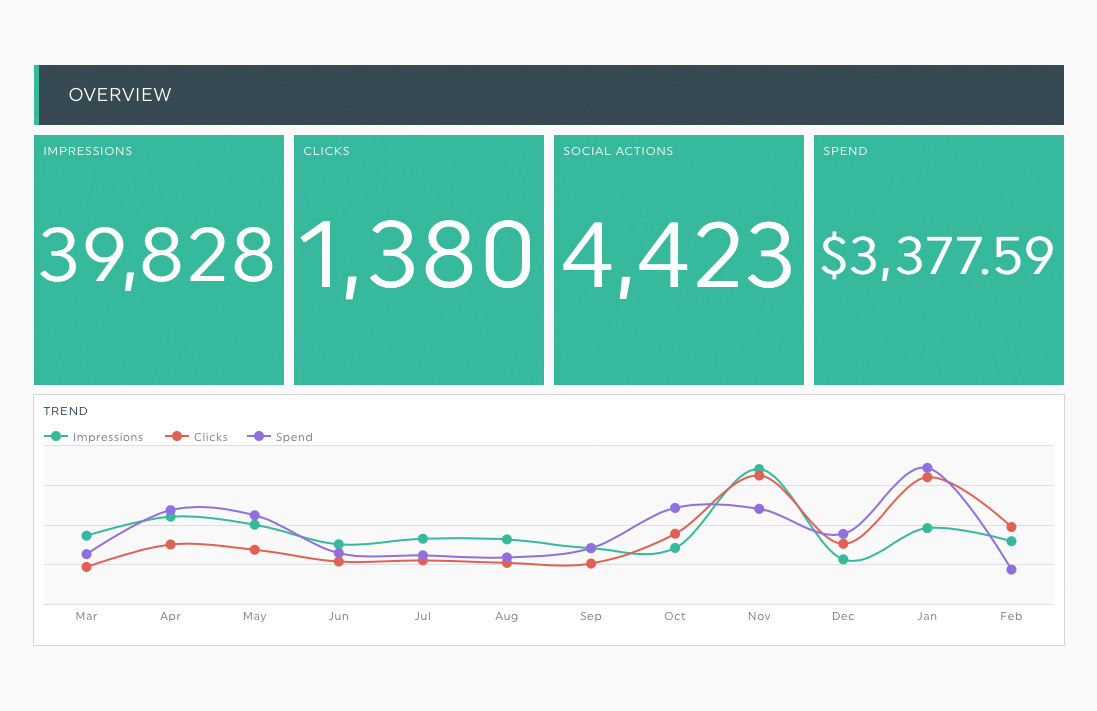
Our automated LinkedIn Ads dashboard template empowers marketers by providing a comprehensive view of their campaign performance and key metrics. With just a few clicks, this template pulls your most important performance metrics directly from your LinkedIn ads account, displaying essential insights like click-through rate, ad spend, conversions, and engagement metrics such as engagement rate. By integrating your data sources seamlessly, DashThis eliminates the hassle of manual reporting, enabling you to automate your digital marketing analysis and make more informed, data-driven decisions.
Optimize your LinkedIn campaigns effortlessly and track your results—all in one powerful dashboard built for simplicity and impact.


 Your logo
Whether your own or your client’s logo, make your report reflect your brand!
 All-in-one
Drag-and-drop your widgets onto your dashboard to create a clean report layout that includes all the information you need.
 Your data
Personalize your widgets to display your LinkedIn Ads data exactly as you want it.
Available Preset Widgets
Featuring the most common KPIs, these widgets are ready to use! Drag, drop, done!
-
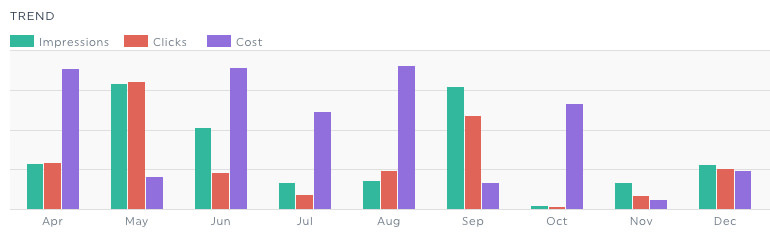
Ad Trends
This trend widget shows the evolution of the total impressions, clicks and cost of your LinkedIn Ads over the time. This way, you can see how your numbers are changing, and the relationship each metric has with the others.
-
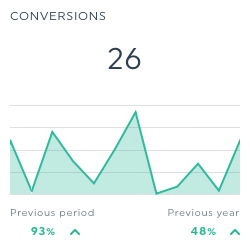
Conversions
This historic widget shows the total number of times people took a desired action after seeing your LinkedIn Ad. This action can be anything from buying a product or service, signing up for a newsletter… it all depends on your objectives and how you implemented the LinkedIn Insight tag on your website.
-
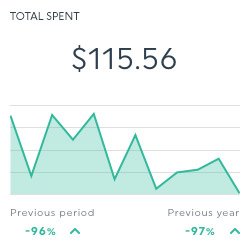
Total Spent
This historic widget shows the total amount spent on your LinkedIn Ads, which will include the cost of your clicks and impressions.
-
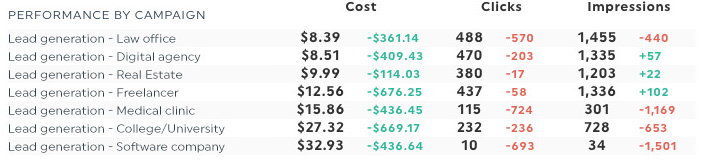
Performance by Campaign
This widget shows each of your campaigns’ number of impressions, clicks and total cost. As a multi-column list, you can see all of your LinkedIn Ads at the same time to see which ones are working and which you still need to optimize.
Available Metrics, Segments, & Dimensions
These are the top 10 metrics users usually include in their LinkedIn Ads dashboards:
- Conversions
- This is the total number of times people took a desired action after clicking on or seeing your ad.
- Impressions
- This is the total number of times people saw your ad.
- Clicks
- This is the number of clicks on your ad. This includes clicks on the ad content and your company name and logo, but excludes some social actions such as likes, comments, and shares.
- Total Spent
- This is the amount you spent on clicks and impressions for your ad.
- Avg. CTR
- This percentage shows how often people go to your website because they saw your ad. It is calculated by dividing the number of clicks by the number of impressions, and multiplying the result by 100.
- Total Social Actions
- This number shows how much social engagement your ad got. It is calculated by adding together the number of likes, shares and comments.
- Total Engagements
- This number combines the total number of social clicks with the total number of paid clicks your ad received.
- Conversion Rate
- This is the percentage of clicks that led to a conversion. It is calculated by dividing the total number of conversions by the total number of clicks, and multiplying the result by 100.
- Return On Ad Spend (ROAS)
- This is the percentage of revenue generated for every dollar spent. It is calculated by dividing the total conversion value by the total spent, and multiplying the result by 100.
- Cost Per Conversion
- This is the average amount you spent on each conversion. It is calculated by dividing the total spent by the number of conversions.
Other Useful Integrations
Get a more inclusive view of your data by including these integrations in your dashboard too:



Frequently Asked Questions About the LinkedIn Ads Integration
Have questions about using LinkedIn Ads with DashThis? Here are a few quick answers.
What is the LinkedIn Ads integration in DashThis?
The LinkedIn Ads integration allows you to automatically pull your LinkedIn Ads campaign data into a live DashThis dashboard. It helps you track ad performance, monitor key KPIs, and create professional reports without manually exporting data from LinkedIn Campaign Manager.
Is LinkedIn Ads data updated automatically in DashThis?
Yes. Once your LinkedIn Ads account is connected, DashThis automatically pulls your campaign data into your dashboard. Your reports stay up to date, so you always have access to the latest performance metrics.
Can I customize my LinkedIn Ads dashboard?
Yes. You can customize your LinkedIn Ads dashboard by selecting the metrics, widgets, date ranges, and layout that match your reporting needs. You can also compare performance over time and highlight the KPIs that matter most to your clients or stakeholders.
Can I combine LinkedIn Ads data with other marketing platforms?
Yes. You can combine LinkedIn Ads data with platforms like Google Ads, Facebook Ads, Instagram, Google Analytics, and SEO tools in a single dashboard. This allows you to present a complete view of your paid media and overall marketing performance.
Can I share my LinkedIn Ads dashboard with clients?
Yes. You can share your dashboard through a live link, schedule automatic email reports, or export it as a PDF. You can also add your logo and brand colors to create fully branded, client-ready reports.
Can I connect multiple LinkedIn Ads accounts?
Yes. If you manage multiple LinkedIn Ads accounts, you can connect them separately and create individual dashboards or consolidate them into one report, depending on how you prefer to present your data.
Learn to use LinkedIn Ads in our Help Center
Read about LinkedIn Ads on our blog
Free tools to improve your LinkedIn Ads Performance
-
CPM Calculator
Calculate CPM (Cost Per Mille) for free. Enter ad spend & impressions to instantly see your cost per 1,000 impressions vs. industry benchmarks.
-
CPC Calculator
Calculate your cost per click instantly with our free CPC calculator. Enter ad spend and clicks to get your CPC and compare it to industry benchmarks.
-
ROAS Calculator
Use our ROAS Calculator to measure the return on ad spend (ROAS) of your campaigns and compare your performance with industry benchmarks.
