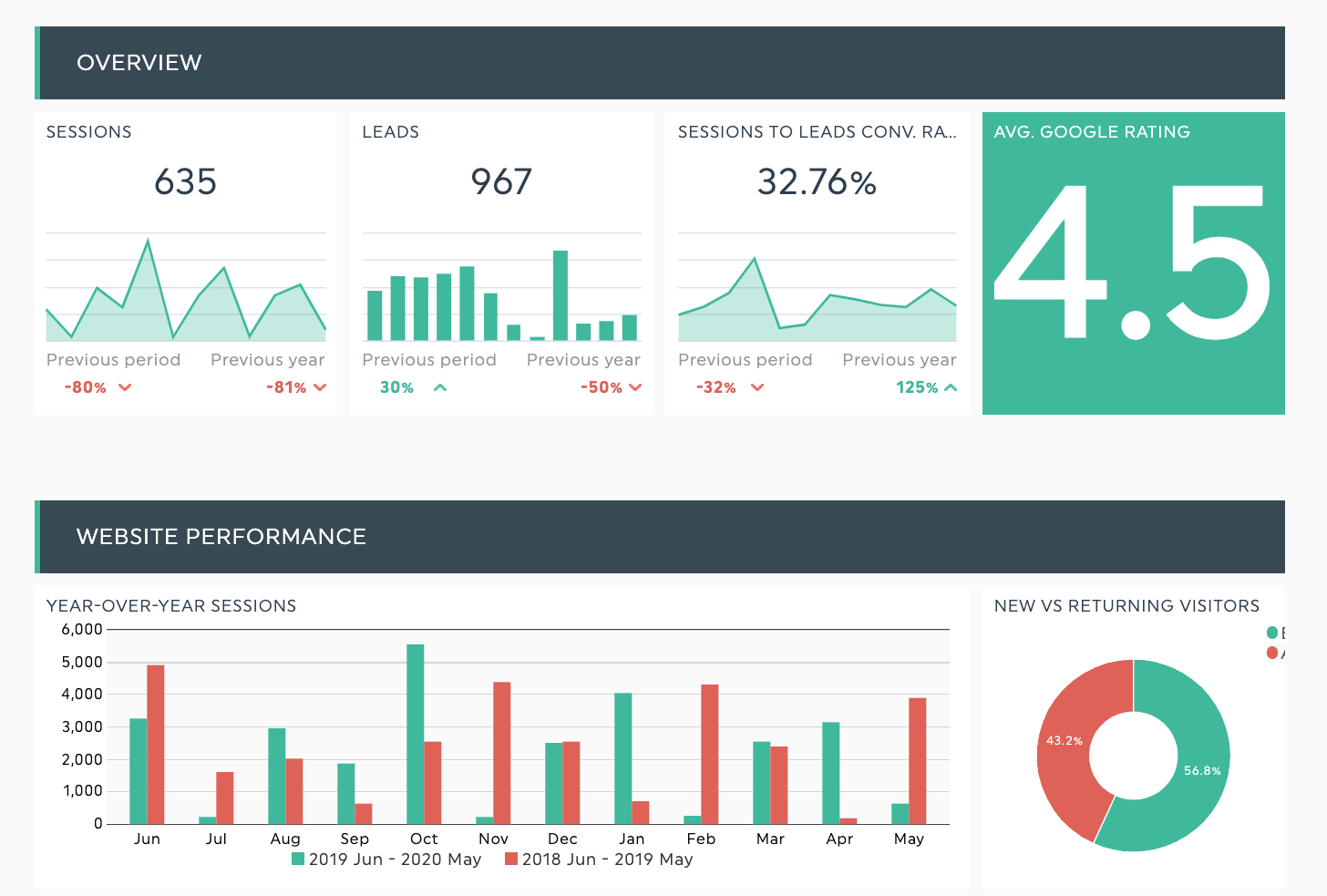


What to include in a local SEO report
A good local SEO report answers three questions for the client: am I visible where my customers search, are they contacting me, and is it growing? These are the KPIs that answer them.
Every local SEO KPI your client cares about, from Google Business Profile calls to map pack rankings, pulled into one automated report. One dashboard per location, or all your locations side by side.
Start your free trialGet 10 dashboards for 14 days

Your local SEO data is scattered across a rank tracker, Google Business Profile, a review tool, and a citation audit. This template pulls it all into one report: map pack rankings, calls and direction requests, new reviews, and organic traffic and conversions for each location, updated automatically every month. For broader organic performance, use our seo report template instead. This is the local variation of it.
A good local SEO report answers three questions for the client: am I visible where my customers search, are they contacting me, and is it growing? These are the KPIs that answer them.
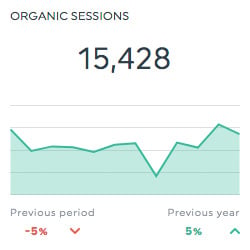
Pinpoint how much of your traffic is coming from organic search results by tracking your organic sessions, or use this same format of historic widget to track the bounce rate.
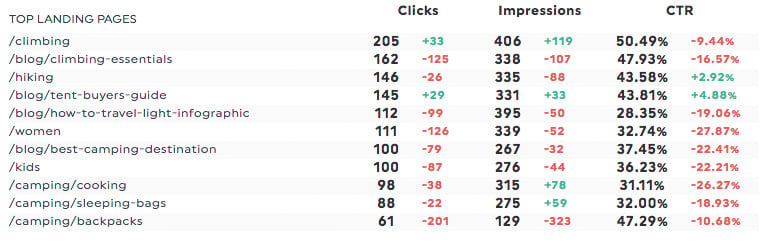
Determine which of your landing pages generates the most qualified organic traffic by using a multi-column widget to track your technical SEO progress.
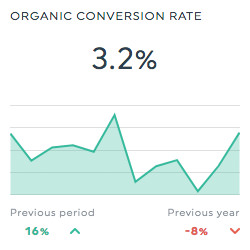
Make sure that your organic visitors are converting with a historic widget showing your organic conversion rate.
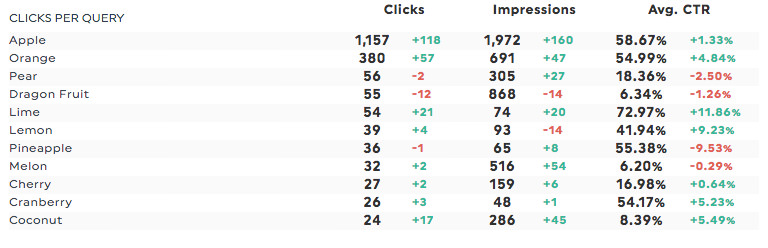
Figure out which keyword brings you the most qualified organic traffic by using a multi-column widget to track the top organic keywords.
Plugging your own data from across a multitude of SEO tools into our simple SEO report template is as easy as 1-2-3!
 Create your DashThis account
Your free trial gives you 10 dashboards for 14 days, no credit card.
 Connect your SEO tools
Google Business Profile, Google Analytics 4, Google Search Console, and your rank tracker. Add one connection per location if you're reporting on several.
 Select your report template
It preloads with the KPIs above, already laid out. Adjust the widgets, set the date range, and you're done. Next month it updates itself.
Pull Google Business Profile data alongside everything else you use:
Never copy-paste data in google sheets or excel spreadsheets anymore. DashThis gives you a pre-built SEO report template, with data automatically filled every day, and the customization power you’d expect from a powerful reporting tool.
 Custom local SEO KPIs
Track the metrics that matter for local: calls, direction requests, map pack position, review velocity. Build custom widgets and calculated metrics for anything your client defines differently.
 White Label local SEO Reports
Your logo, your colors, your domain, your client's inbox. The report looks like it came from your agency, because it did.
 Report cloning for every location
Build the report once for one location, clone it for the next twenty. Change the data source, keep the layout. This is the feature multi-location reporting lives or dies on.
 Automated delivery
Schedule the report by email, share a live URL that always shows current data, or export to PDF for the client who still prints things.
 Comments and takeaways
Add your analysis directly on the dashboard so the client reads the "why" next to the numbers, not in a separate email they'll never open.
 MCP connector
The DashThis MCP connector makes your dashboards callable straight from Claude and ChatGPT. Ask a question in plain language and get answers grounded in your real data, your clients' goals, and their full reporting history.
It’s so easy to show the results of your SEO efforts with DashThis' easy sharing options.
 By email
You’ll never have to send SEO reports manually again with our easy automated email dispatch; your clients or team will receive a link to access their reports whenever they want, and you can even include a PDF copy of the report!
 With a URL share
Share your SEO reporting template with a URL. It’s easy, convenient, and your client or boss will be able to access your SEO report anytime, wherever internet is available!
 With a PDF
Exporting your SEO report template as a PDF is as easy as can be! You can automatically attach your PDF reports to your email dispatch, print them if you need a hard copy, or send them yourself to your team in an email! It’s up to you!
No matter what kind of digital marketing report you’re creating, DashThis makes it simple! Track all your data sources from every marketing strategy, from ecommerce to google ads or local SEO with our multiple SEO report templates.

 Backlink Profile Report
Keep tabs on your competitors’ new backlinks, how many you’ve got, the domain name, the domain and page authority, etc. Competitor analysis has never been easier.
 Keyword Ranking Report
Get all your rank tracking data in DashThis and see how your keywords are ranking on various search engines, and how their average position evolves over time.
Organic Traffic Report
Connect DashThis to your Google Analytics and Google Search Console accounts and keep track of how your or your client's website's organic search traffic is doing.
 SEMrush Report
Track your search visibility, keyword rankings and SERP positions, and identify opportunities in order to best outrank your competitors with a SEMRush report.
 Moz Report
Monitor your website’s SEO with a Moz report, and get a precise view of what’s working and what needs to be worked on.
 Ahrefs Report
Build a report to keep track of how your competitors are ranking on search engines, and make sure your strategy points in the right direction.
DashThis is the power behind thousands of monthly online marketing reports. Still wondering if we’re really THAT cool? These folks seem to think so!
I was skeptical about DashThis’s new AI Insights but when I tried it, I was shocked. It sounded exactly like how I’d write it, with accurate and even insightful recommendations. I’m really looking forward to seeing how much time we can save this month.
The biggest benefit is the time saved in terms of data collection. It's also great that the design is very pretty out of the box.
We've played around with countless reporting tools over the years but none of them come anywhere close to Dashthis. The level of integration and customization of reports, as well as their outstanding client support are unrivalled!
DashThis allows me to quickly and easily get my clients key multi-channel performance metrics in one easy to digest report!
Game changer for client communications and expectations. Also help in the sales process!
We have so much less manual work to do; we save many hours a month that can instead be used for our customers!
Customer service has been great, quick responses. The dashboard is awesome, looks good, and has everything we need to client reporting. Kudos!
Phenomenal customer service.
This tool has helped us close new accounts and improve customer satisfaction.
We use so many different reporting platforms - this consolidates what we give our clients.
DashThis is a phenomenal tool for communicating with clients and staff. With 10 minutes of set up, I can create a custom report for a client that speaks to their digital marketing goals.
We used to spend 30-40 hrs on monthly reporting. We’re now down to 10-20 hours max while providing even more detailed information.
At minimum: local pack rankings for your target keywords and locations, Google Business Profile actions (calls, direction requests, website clicks), review count and average rating, organic sessions and conversions broken down by location, and a comparison against the previous period so the client can see direction, not just a snapshot.
A regular SEO report measures site-wide organic visibility: rankings, traffic, backlinks, conversions. A local SEO report measures visibility in a specific place. It adds Google Business Profile performance, map pack position, reviews, citations, and per-location breakdowns, because a local business competes within a radius rather than nationally. Many agencies send both: the seo report template for overall organic performance, and this local version for location-based results.
Two options. Clone the template once per location so each client or franchisee gets their own report, or build one report with location as a breakdown dimension so a regional manager sees all locations side by side. Agencies usually do both: individual reports for the location owners, a roll-up for whoever signs the contract.
Yes. The Google Business Profile integration pulls impressions, calls, direction requests, website clicks, and profile interactions, and you can combine those with GA4 and Search Console data in the same report.
Monthly is the standard for client reporting since local SEO moves slowly and monthly smooths out weekly noise. Keep a live dashboard URL open for anyone who wants to check in between reports. You can set any date range or schedule you like.
The template itself is included with every DashThis plan, and you can build and test it during a free 14-day trial with 10 dashboards. No credit card needed to start.
Yes. Add, remove, or rearrange any widget, add your own custom metrics, apply your branding, and save it as your own agency template so every new client starts from your layout.



