The 5 Best SEO Report Dashboard Templates for Faster Reporting in 2026

TLDR: The five best SEO report dashboard templates in DashThis automate your reporting by pulling organic traffic, keyword rankings, backlinks, and conversion data from Google Analytics, Google Search Console, Semrush, Ahrefs, and Moz into one view. Build a report once, reuse it forever, and cut SEO reporting from 5 hours to 5 minutes. Starts at $44/month with a free 14-day trial.
Why an SEO report dashboard saves your week
Reporting is the part of search engine optimization no one signs up for, but every SEO ends up doing.
Between Google Analytics 4 sessions, Google Search Console queries, Semrush keyword movements, and Ahrefs backlinks, a single monthly SEO report can eat 25 to 30 percent of agency time, hours that could go to keyword research, technical fixes, and content optimization. If your reports still take hours, an SEO reporting dashboard is the shortcut. Connect your tools once, and it refreshes itself every time you open it.
This guide walks through the five SEO dashboard templates inside DashThis, the SEO metrics each one tracks, and how to pick the right one for your work. By the end, you should know exactly which template to load and what it will look like with your data inside.
What is an SEO dashboard?
An SEO dashboard is a single visual report that aggregates SEO performance data from tools like Google Analytics, Google Search Console, Semrush, Ahrefs, Moz, and Google Business Profile into one real-time view. SEO specialists, agencies, and in-house teams use it to track organic traffic, keyword rankings, backlinks, CTR, and conversions, then share results with clients or leadership without manual exports from spreadsheets or Google Sheets.
A good SEO reporting dashboard answers three questions at a glance:
-
Is organic search performance going up, flat, or down compared to the previous period?
-
Which landing pages, specific keywords, or campaigns are driving the change?
-
What optimization opportunities should we tackle next?
If your current reporting setup cannot answer those three questions in under a minute, it is costing you hours every month.
Why use an SEO report dashboard instead of spreadsheets?
Spreadsheets, Google Sheets, and stand-alone SEO tools work, but they do not scale. Most growing teams eventually move to dedicated SEO reporting software.
Once you have more than two or three clients (or more than one stakeholder asking for updates), you start spending more time formatting than analyzing.
An SEO report dashboard gives you four things a spreadsheet cannot:
-
Real-time data. Connect once and the dashboard refreshes automatically, so the numbers are always up to date.
-
Multi-tool aggregation. Combine GA4, GSC, Semrush, Ahrefs, Moz, and ad platforms in one view instead of bouncing between connectors.
-
Visual storytelling. Charts, KPI widgets, and notes turn raw performance data into a narrative your client or CMO can understand in 30 seconds.
-
Repeatable templates. Build a layout once, reuse it for every client, every month.
The math is simple. If you cut a 5-hour monthly SEO report down to 5 minutes across 10 clients, you save roughly 50 hours of agency time every single month. That is one full work week back.
What should an SEO reporting dashboard include?
Before you pick a report template, decide what the dashboard actually needs to show. The best custom dashboards do not try to display everything. They show the few key metrics that map back to business goals, plus the supporting data needed to explain them.
A complete SEO performance dashboard usually includes:
-
Core traffic metrics: organic traffic, search traffic, organic users, and year-over-year growth
-
Visibility metrics: keyword rankings, average keyword position in the SERPs, impressions, click-through rate (CTR)
-
Engagement metrics: average engagement time, pages per session, bounce rate
-
Conversion metrics: goal completions, leads, conversion rates, e-commerce revenue from organic search
-
Top content: best-performing landing pages and exit pages
-
Technical SEO health: indexed pages, technical issues, crawl errors, Core Web Vitals from a site audit
-
Off-page signals: referring domains, new backlinks, anchor text distribution from link building
-
Local SEO (if relevant): Google Business Profile views, calls, direction requests, and review scores
You do not need every category in every report. As Dana DiTomaso of Kick Point puts it:
"The client doesn't care about the 24 pages of data that you care about. They might care only about 3 things, and it's okay to give the client a report that covers only these 3 things."
Pick the KPIs that prove progress against the goals your client or stakeholder actually cares about. Park the rest.
The 5 best SEO report dashboard templates in DashThis
Every template below is pre-built inside DashThis. Connect your data sources, click load, and you have a working SEO reporting dashboard in under 5 minutes. They are all customizable, drag-and-drop, and white-label ready.
| Template | Best for | Core data sources | Key SEO metrics |
|---|---|---|---|
| SEO report | All-in-one SEO reporting for any client or team | GA4 - GSC - Semrush - Moz - Ahrefs | Organic traffic - keyword rankings - backlinks |
| Google Analytics report | Traffic and behaviour deep dives | Google Analytics 4 | Sessions - conversion rates - top pages - bounce rate |
| Digital marketing report | Multi-channel campaigns where SEO is one piece | GA4 - GSC - Google Ads - PPC - Meta - email | Channel ROI - organic search vs paid - campaign performance |
| Google Business Profile | Local SEO and brick-and-mortar businesses | Google Business Profile | Views - calls - direction requests - reviews |
| Content report | Content teams measuring content ROI | GA4 - GSC - HubSpot - social media | Page views - time on page - leads - content ROI |
1. SEO report template
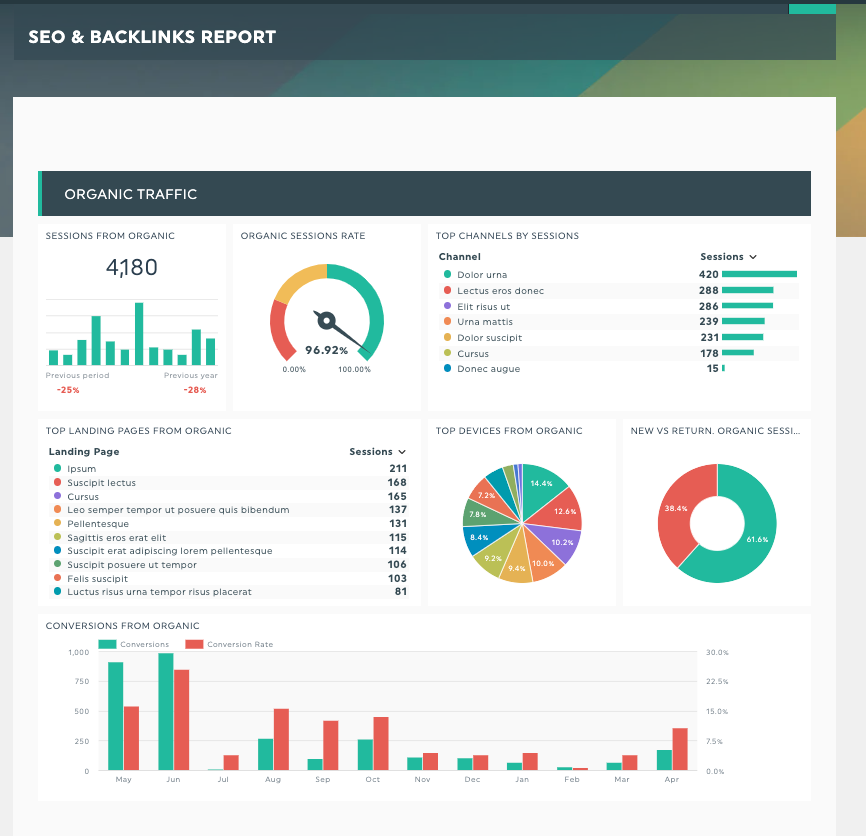
An SEO report template in DashThis. See it with your own data
The SEO report template is the all-in-one option, and the right starting point if you are not sure which one to pick. It pulls together every SEO metric an agency, freelancer, or in-house team typically reports on, organized into clean sections so the reader knows exactly where to look.
What's inside:
- An overview block with organic traffic, sessions, users, and conversions, with month-over-month and year-over-year comparisons
- A keyword rankings section connected to Google Search Console and your rank tracker (Semrush, Ahrefs, or Moz)
- A landing pages section that surfaces your top organic pages by search traffic and conversion rates
- A backlinks and link-building block with new referring domains, lost domains, and anchor text breakdowns
- Pre-built headers and notes so the dashboard tells a story instead of just listing numbers
Best for: agencies, SEO agencies, or in-house teams who need one all-in-one SEO report to deliver every month.
Pro tip: if you work with local businesses, swap in widgets for Google review scores and Google Business Profile actions next to the organic traffic block. It instantly makes the report more relevant to the client.
2. Google Analytics report template
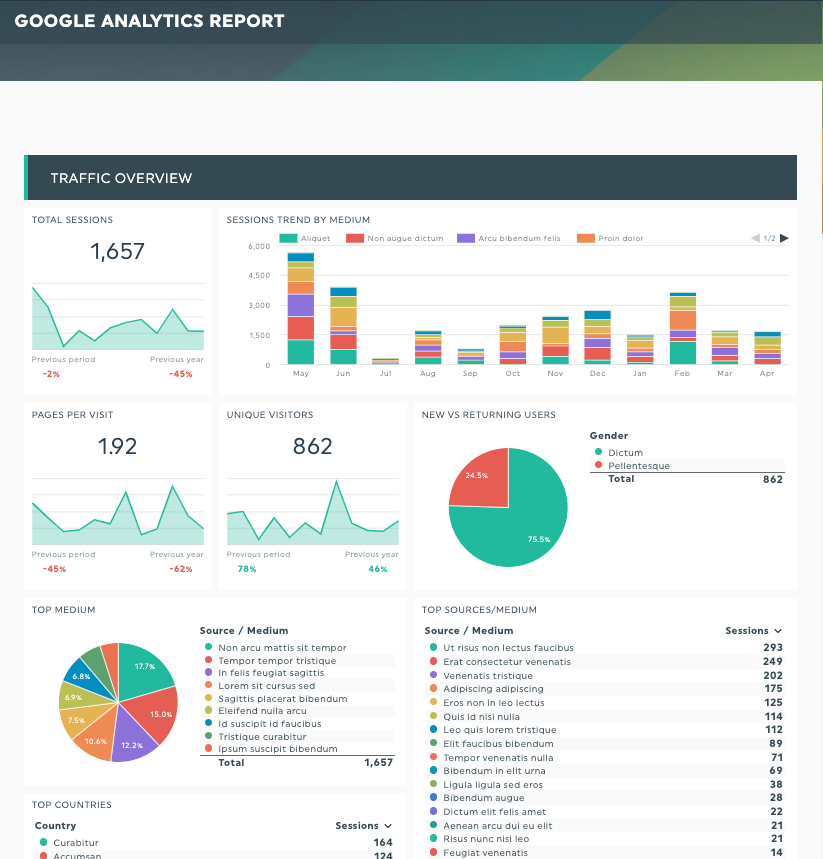
DashThis’s Google Analytics report template
GA4 is the engine room of most SEO programs, but the native interface is dense and not exactly client-friendly. The Google Analytics report template gives you a polished, single-page view of the GA4 data that actually matters for SEO reporting.
What's inside:
- Top traffic sources and channels, with organic search broken out separately
- Goal completions and conversion rates by source
- Top landing pages and exit pages, with engagement metrics
- Audience demographics and device breakdowns
- Bounce rate and engagement time by page
Best for: any team that lives inside Google Analytics and needs to share a clean, visual version with people who do not.
Pro tip: layer in Google Search Console data using the GSC connector. Connecting both gives you the full picture from impression to click to on-site behaviour, which is critical for explaining website traffic swings month to month.
3. Digital marketing report template
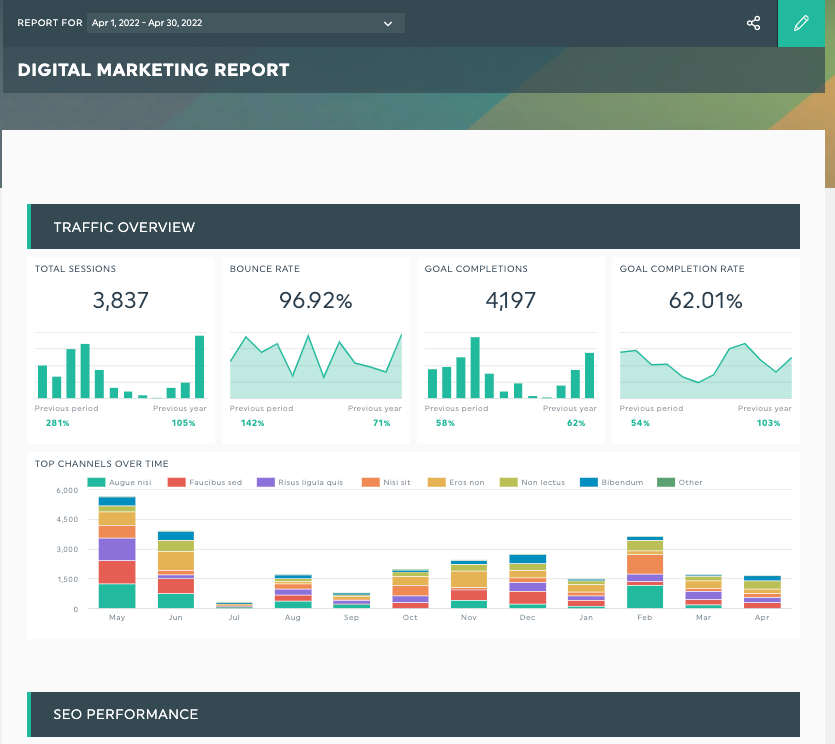
DashThis’s digital marketing report template
If SEO is one of several channels you run, the digital marketing report template is the fastest way to put it all in one place. It has a dedicated SEO section sitting alongside PPC, paid social, email, and landing page performance, so stakeholders can see how organic compares with everything else.
What's inside:
- An SEO block with organic traffic, top specific keywords, and conversions
- A paid search block (Google Ads, Microsoft Ads) with spend, clicks, and ROAS
- A social media block with key metrics from Meta, LinkedIn, X, and TikTok
- An email marketing dashboard block with opens, clicks, and conversions
- A landing page performance section tying it all together
Best for: agencies and in-house digital marketers running multi-channel campaigns who want one consolidated client report.
Pro tip: lead the dashboard with a top-line ROI summary across all channels, then break each channel into its own section. Executives skim the top, channel managers dig into their section.
4. Google Business Profile template
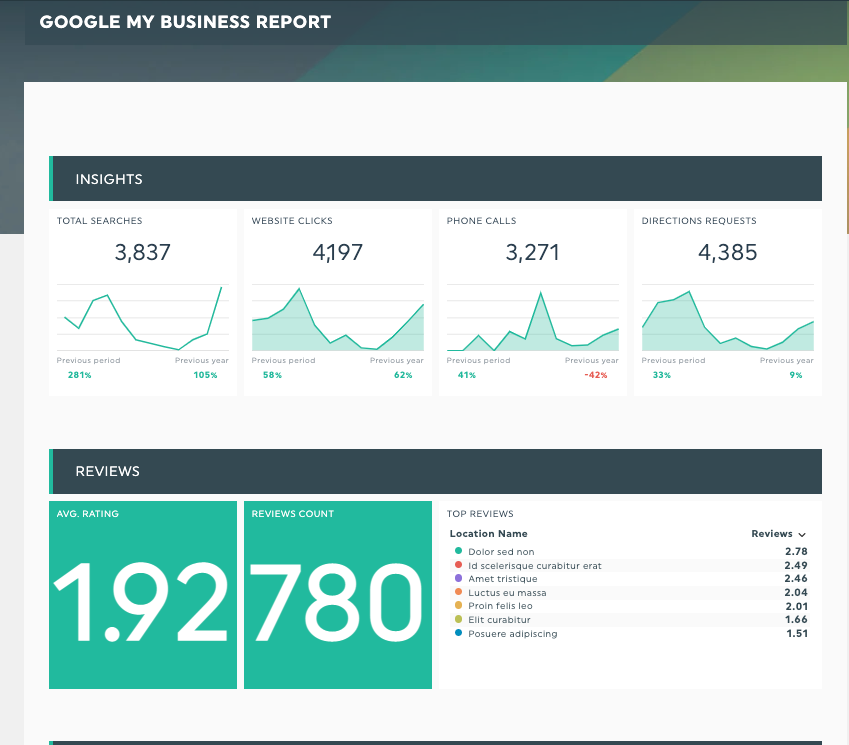
DashThis’s Google My Business report template
For local businesses, Google Business Profile is often a bigger driver of phone calls and foot traffic than the website itself. The Google Business Profile template tracks the metrics that connect a profile to actual revenue, making it the natural pairing for any local SEO program.
What's inside:
- Total profile views from Search and Maps
- Customer actions: calls, direction requests, website traffic clicks, message taps
- Photo and post performance
- Average review score and review volume over time
- Top search queries that surfaced your profile in the SERPs
Best for: local SEO consultants, multi-location businesses, restaurants, retail, healthcare, automotive, and any client who relies on foot traffic.
Pro tip: pair this template with the SEO report template inside the same DashThis account. You get organic search performance and local performance side by side without rebuilding anything.
5. Content report template
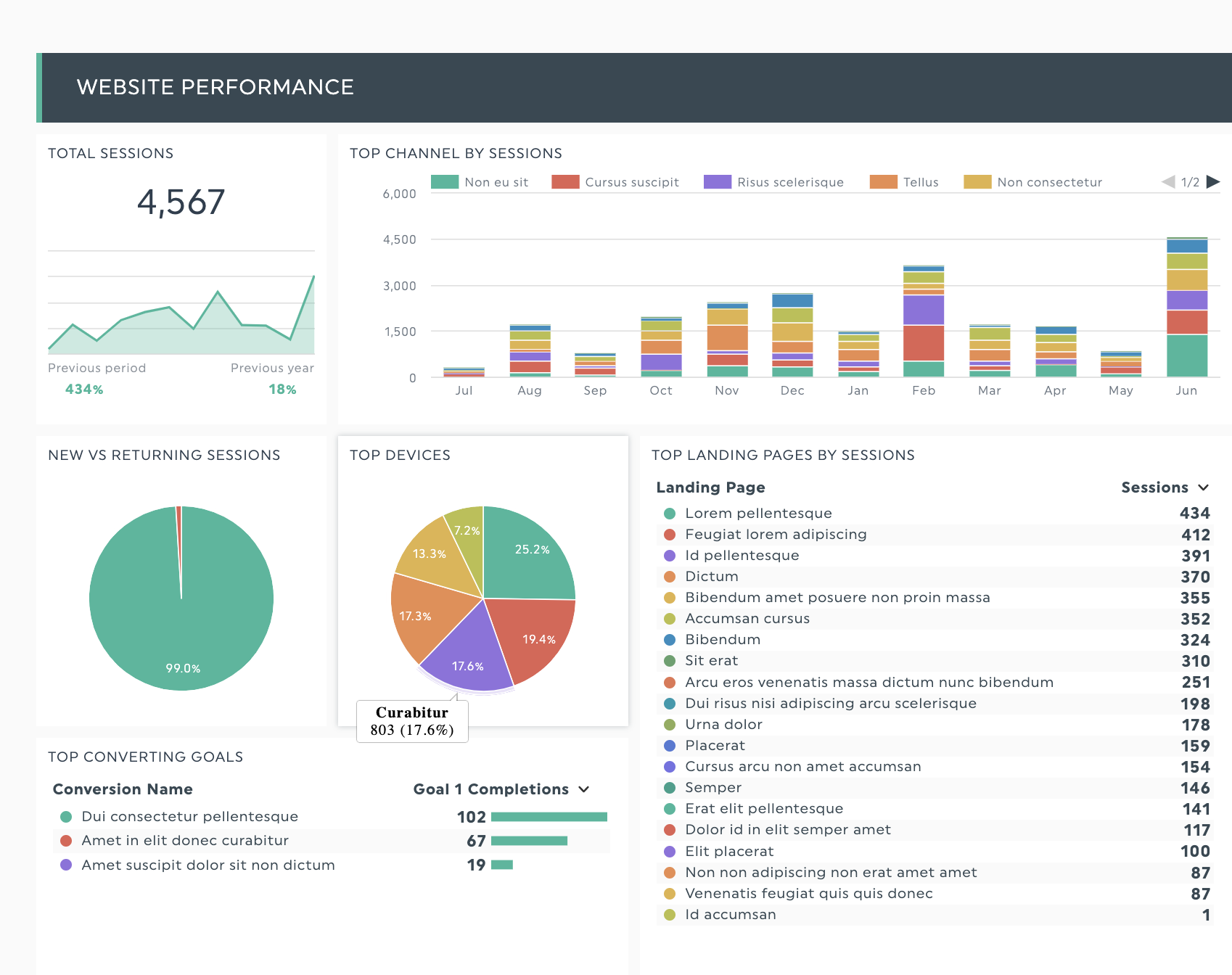
DashThis’s content report template.
Content marketing only works if you can prove the content is doing something. The content report template tracks every metric that connects an article or landing page to pipeline, leads, and revenue, so you can finally answer "what is our content actually returning?"
What's inside:
- Page views, unique visitors, and average engagement time per article
- Top content by organic traffic and by conversion
- Lead and form-fill data per piece of content
- Content ROI metrics (cost per content asset versus revenue or pipeline driven)
- Social shares and referring domains earned per article
Best for: content marketing teams, in-house content leads, and agencies offering content as a service.
Pro tip: tag your content by funnel stage (top, middle, bottom) and add a section for each. It makes underperforming middle-of-funnel content much easier to spot and fix as part of your SEO strategy.
How to choose the right SEO dashboard template
Use this short logic to pick the right one:
- If you only need to report on SEO, start with the SEO report template.
- If your stakeholder is GA4-curious but not SEO-fluent, use the Google Analytics report template.
- If SEO is one of many channels in the same report, use the Digital marketing report template.
- If your client is a local or multi-location business, layer in the Google Business Profile template.
- If you sell content marketing as a service or own the content function in-house, use the Content report template.
You can also combine dashboard templates inside one DashThis dashboard. For example, an SEO agency reporting on a local plumbing client might run the SEO report template and the Google Business Profile template stacked into a single white-labeled view.
How to build your SEO reporting dashboard in 4 steps
Setup takes around 5 minutes for a first dashboard, and seconds for every dashboard after that.
Step 1. Start your free DashThis trial. You get full access to every template and integration for 15 days. No credit card required, and no setup fee.
Step 2. Connect your data sources. Click an integration, sign in once, and DashThis pulls your SEO data automatically. There are 30+ connectors available, including Google Analytics 4, Google Search Console, Google Business Profile, Semrush, Ahrefs, Moz, Google Ads, Meta Ads, LinkedIn Ads, HubSpot, and Mailchimp.
Step 3. Load a report template and pick your KPIs. Open the SEO dashboard template you chose, scan the preset widgets, and keep the key metrics that map to your client's goals. Drag and drop to reorder. Add section headers so the dashboard reads top to bottom like a story.
Step 4. Customize, white-label, and share. Add your logo or your client's logo, switch colour palettes, and either share a live link or schedule an automated PDF or email delivery on the cadence your client expects.
DashThis starts at $44/month after the trial, and reports refresh automatically forever after that. Build the SEO reporting dashboard once, reuse it across every client and every month.
Cut SEO reporting from 5 hours to 5 minutes with DashThis
The hardest part of SEO reporting is not the SEO. It is the formatting, the copy-pasting, and the second-guessing of whether the numbers in column F match the chart on slide 4. Templates remove all of that. You build the structure once, connect the data sources once, and from there every monthly report is a few clicks instead of a half-day project.
If you are still living inside spreadsheets, the easiest move is to load one of these five DashThis templates with your own data and see how much faster your next SEO report comes together. Most DashThis users finish their first dashboard during the 14-day free trial.
Try DashThis free for 15 days.
Connect your tools, load a template, and ship your next SEO report in 5 minutes instead of 5 hours

Read More

Don’t miss out!
Follow us on social media to stay tuned!


Automate your reports!
Bring all your marketing data into one automated report.
Try dashthis for free